

E-commerce Product page

Solution retrospective
E-commerce Product Page
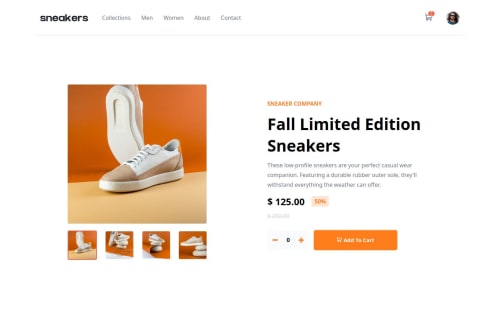
This project is a solution to the E-commerce product page challenge on Frontend Mentor. It is built using Vue 3, Tailwind CSS, Vuex store, and Vite.
Overview
The ChallengeThe challenge required implementing an E-commerce product page with specific features:
- View optimal layout based on device screen size
- Hover states for interactive elements
- Lightbox gallery for large product images
- Switching large product images by clicking on small thumbnails
- Adding items to the cart
- Viewing and removing items from the cart
- Vue 3
- Tailwind CSS
- Vuex store
- Vite
How to Run
To run the project:
- Clone the repository.
- Install dependencies with
npm install. - Start the development server with
npm run dev. - Open your browser and navigate to
http://localhost:5173/.
Continued Development
In the future, I aim to explore more advanced features and optimize performance.
LinksAuthor
- Website - Bruck Demssie
- Frontend Mentor -@Bruck-3
Acknowledgments
I'd like to thank Frontend Mentor for providing this challenge, which helped me enhance my skills. Additionally, I'm grateful for the support and resources provided by the Vue.js and Tailwind CSS communities.
What challenges did you encounter, and how did you overcome them?Challenges Faced
Dynamic Image URL GenerationOne of the challenges encountered was building an image carousel that accepts dynamic URLs. The requirement was to dynamically generate image URLs based on the index to ensure proper sourcing of images, especially when the project is hosted.
SolutionTo overcome this challenge, a method getImageUrl(index) was implemented. This method constructs the URL for each image based on the index provided. The import.meta.url property was utilized to ensure correct resolution of relative paths, especially in a dynamic environment.
getImageUrl(index) {
  return new URL(`../assets/shoes/image-product-${index}.jpg`, import.meta.url).href;
}
Please log in to post a comment
Log in with GitHubCommunity feedback
No feedback yet. Be the first to give feedback on Bruck Demissie's solution.

Join our Discord community
Join thousands of Frontend Mentor community members taking the challenges, sharing resources, helping each other, and chatting about all things front-end!
Join our Discord