

Blog Preview Card with HTML, SCSS

Solution retrospective
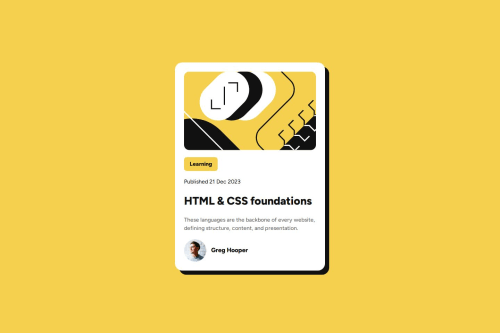
I'm most proud of how I managed to create a clean, responsive design for the "Blog Preview Card" challenge. I focused on ensuring that the layout looked good on both desktop and mobile devices, which required some careful adjustments with media queries. The use of SCSS for styling allowed me to maintain cleaner and more manageable code with variables and mixins, which made the styling process smoother.
If I were to do things differently next time, I would pay more attention to accessibility features, such as improving color contrast for readability and ensuring that all interactive elements are properly focusable and keyboard-navigable. Additionally, I would explore using a more flexible layout system, like CSS Grid, to give me more control over the positioning of elements, especially when working with dynamic content.
What challenges did you encounter, and how did you overcome them?One of the main challenges I encountered was ensuring the responsiveness of the layout across different screen sizes. While I was familiar with media queries, finding the right breakpoints and adjusting the layout for smaller screens required some trial and error. Specifically, I had to tweak the widths and spacing to ensure the content didn’t feel cramped on mobile devices.
To overcome this, I tested the design frequently on various screen sizes, making small adjustments to ensure everything looked balanced. I also made sure to use relative units like vw and vh for dimensions and padding, which helped maintain a more fluid and flexible layout. Additionally, I utilized flexbox to easily center and align elements, which made the layout more adaptable without complex calculations.
Another challenge was ensuring the styling was visually appealing and accessible. I worked on refining the color contrast and typography to make the text more readable. Testing the design with different accessibility tools helped me identify areas for improvement, such as ensuring good contrast between text and background.
What specific areas of your project would you like help with?Code optimization: How to make your code cleaner or more efficient. Responsive design: Asking if your design works well on all screen sizes, or if there are better ways to handle responsiveness. Accessibility: How to make your project more accessible to users with disabilities. Performance: Tips on making your project faster or more efficient (e.g., image optimization, reducing CSS file size). UI/UX: Any suggestions on improving the user interface or overall experience of the design.
Please log in to post a comment
Log in with GitHubCommunity feedback
No feedback yet. Be the first to give feedback on srinu-vinay-kumar's solution.

Join our Discord community
Join thousands of Frontend Mentor community members taking the challenges, sharing resources, helping each other, and chatting about all things front-end!
Join our Discord